
To get started in my new journey into HF Remote, I wanted to setup a Single Op, Single Radio station that I could use to operate a CW contest from a remote QTH.
The Goal of this Setup
The goal of this first setup was to remotely operate during a CW Contest. CQWW WPX CW was coming up. the WPX contests are a favorite of mine, so this seemed like a good time to give it a try. Keeping it simple was still part of the objective. When I operate a CW contest, I use N1MM+ software for rig control and logging. I do like to do some manual CW but that will not be possible at this time, as that function is not supported by any of the remote software solutions that I have seen to-date. In N1MM+ you can pop-up a text entry box to send some ad hoc keyboard CW.
Software on the Rig-control Computer
My Icom radio is connected to a PC directly through a USB port. I have the following software installed on that PC for this effort:
- N1MM+ for contest operating
- Remote Desktop Software
- Icom RS-BA1 Rig control software
I will only have N1MM+ running nearly at all times on this PC. I only use the ICOM rig-control software if something goes wrong, or if some radio setting needs to be changed. This is a backstop, intended to save me from disaster. I can only run N1MM+ OR the Icom Rig-control software due to potential control-port conflicts. I highly recommend including some radio-specific Control software as a backstop. There are many options available for this function.
N1MM+ is very easy to configure for any radio that can be controlled by a PC. To allow me to use only N1MM+ software during the contest, I created one MACRO which activates the internal antenna tuner on the ICOM radio. This is assigned a function key on the N1MM+ GUI. This allowed me to freely change frequencies and antennas using only the N1MM+ interface.
Software on the Remote Computer
The only software used for this setup on the Remote Computer is Remote desktop Software.
Operating the Station
To get the station working, all that is required is to get the Remote Desktop software working with Audio coming from the Radio to the Remote location. While this sounds simple, it can be difficult, depending upon the software that is used. I have been using NOMACHINE for all of my Remote Desktop work recently. However, in this case, NOMACHINE let me down (more on that in a minute). I also loaded ANYDESK on the computers at both ends. After my experience in the WPX CW contest, I will be keeping both of these Remote Desktop suites on my computers.
I started the contest at the Rig location on Friday night. My plan was to travel to another QTH on Saturday and spend some time remote-operating in the contest with the same radio and antennas. I fired-up my NOMACHINE Remote Desktop and immediately saw my remote station’s N1MM+ display. BUT, there was something seriously wrong with my connection. It was slow, the screen was acting very strangely, and I was unable to perform even basic functions on the remote PC using my local mouse and keyboard. This was the case all Saturday night, resulting in a total failure. This was a huge surprise to me, as I have recently spent many hours using this exact connection to do some 3D CAD design work. I posted some NOMACHINE forum messages and we are still troubleshooting this failed connection.
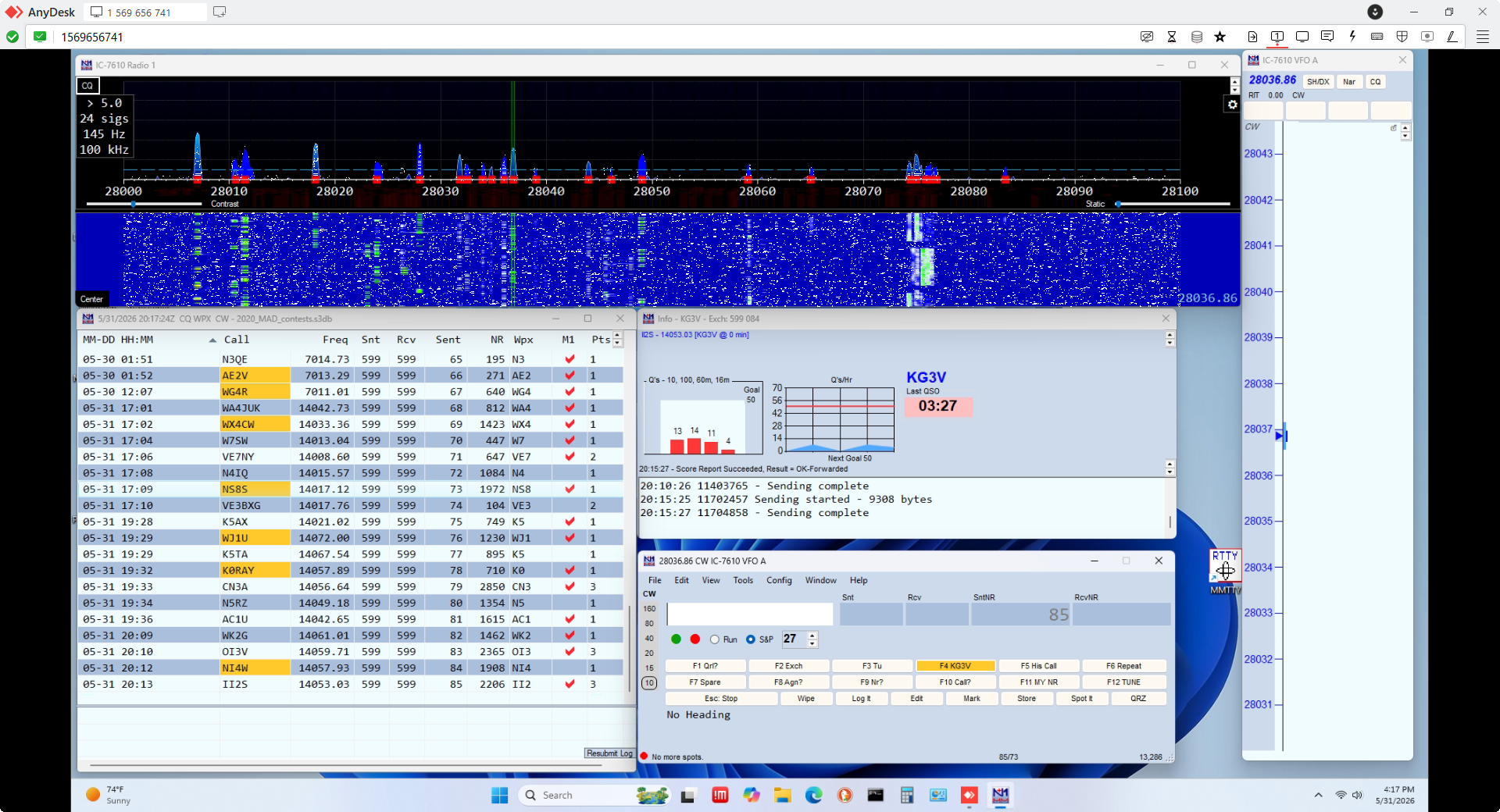
I found a back-door way to get into the PC at the radio (by connecting through another PC at the QTH where the radio was located) and installed ANYDESK, which I have used for remote radio access in the past. Once I got ANYDESK up and running on both PCs, I had a usable connection. I was getting some periodic pops and crackles in the audio, but it was mostly clean enough to work the contest. I did avoid RUNNING (calling CQ) and instead just hunted stations in Search-and-pounce mode. This worked pretty well and I completed 50 or 60 QSOs on Sunday. Below is a screen shot of a brief check for activity on 10 meters during the contest.
Summary and Things To-do
After the initial disaster, things are now working and I will be able to operate CW remotely using this setup in the future. The latency of the Internet connection was a minor issue. But given the fact that I have not yet taken any steps to reduce latency, I would say it worked well. I do have plans to improve the audio quality and latency. This will probably require using an alternate audio path, separate from the audio facilities in the Remote Desktop software.
I definitely have some work to do on the Remote Desktop software. I need to determine why I could not get a good connection on my Remote WINDOWS 11 computer from my WINDOWS 10 computer at the remote location using NOMACHINE. I normally use NOMACHINE on a daily basis to connect between several computers, with very reliable connectivity.
Update on the NOMACHINE Problems
I received a reply form a very helpful person on the NOMACHINE Forum about the trouble I was having with my connection from a WIN10 PC to a WIN11 PC. There is a setting to “disable client hardware decoding.” I had to select this to repair the connection. The funny thing is that this was never an issue in the past when I used this same connection a few hundred times. This is not the first time that I have struggled with different versions of WINDOWS talking thorugh Remote Desktop software. Wouldn’t you just think that would be easy? Yes. I still hate WINDOWS….
Here is the specific Setting recommendation that I got from the Forum – Thanks BRITGIRL!
"If it's happening only when connecting from Win10, please try disabling HW decoding. You can do that within the session. Open the menu (Ctrl-Alt-0), go into Display > Change settings > Modify (Advanced settings) and tick the box Disable client side hardware decoding. Does that help? "


Leave a Reply